1 什么是pod
它由一组、一个或多个容器组成, 每个容器都有自己的 pid mount user 每个Pod还包含了一个Pause容器,Pause容器是Pod的父容器,基础容器, 主要负责僵尸进程的回收管理 pod里的每个容器都继承该容器, 通过Pause容器可以使同一个Pod里面的多个容器共享存储、网络、PID、IPC等
pod里的容器 IPC,UTS,network 就是共享的. pid 是否需要共享需要设置
把pod 看成一台计算机, 容器看成里面的进程
2 为什么引入pod
强依赖的服务需要部署在一起 nginx 与php,多个服务需要相互协作,pod内容器之间用localhost:port来访问彼此,因为他们共用一个网络空间
兼容其他cri标准
3 pod的yaml定义
- 下面这个pod, 会有一个容器启动失败的,因为80端口已经有被占用
- nginx1 执行完后退出
- nginx2 ok, 使用pod ip的端口80
- nginx3 发现80 端口被占用…
1apiVersion: v1
2kind: Pod
metadata:
3  name: nginx
4  namespace: test
5  labels:
    app: nginx
6spec:
  containers:
  - name: nginx1
    image: nginx:1.14.2
7    imagePullPolicy: IfNotPresent
8    securityContext:
      privileged: true
9    env:
    - name: HELLO
      value: world
    ports:
    - containerPort: 80
      hostPort: 8901
10    command: ['echo']
11    args: ["$(HELLO)"]
12    workingDir: /test
13    resources:
      requests:
        memory: "64Mi"
        cpu: "250m"
      limits:
        memory: "128Mi"
        cpu: "500m"
  - name: nginx2
    image: nginx:1.14.2
    imagePullPolicy: IfNotPresent
    ports:
    - containerPort: 80
      hostPort: 8901
  - name: nginx3
    image: nginx:1.14.2
    imagePullPolicy: IfNotPresent
14    ports:
    - containerPort: 80
      hostPort: 8902
15  hostAliases:
  - ip: "180.101.50.188"
    hostnames:
    - "abc"
    - "baidu"
16  restartPolicy: Never
  # hostNetwork: true
17  dnsPolicy: Default
  dnsConfig:
    nameservers:
- 8.8.8.8- 1
- 版本
- 2
- 资源类型
- 3
- pod的名字
- 4
- 命名空间,不指定的话,默认是default, 指定的话,这个命名空间必须存在
- 5
- 标签,可以多个, 将来用来过滤选择指定pod
- 6
- spec : specification 表示规格,规范,明细单,指定pod里创建什么样的容器
- 7
- 镜像拉取策略
- 8
- 这个表示特权模式,相当于用root 执行security-context
- 9
- 设置环境变量, 通过env设置的环境变量将覆盖容器镜像中指定的所有环境变量
- 10
- 相当于dockerfile里的entrypoint, 可以修改容器的启动命令,如果未提供,则使用镜像的 ENTRYPOINT
- 11
- 相当于dockerfile里的CMD,传递参数,如果未提供,则使用镜像的 CMD,这里我们使用了上面配置的环境变量
- 12
- dockerfile中的Dir ,如果未指定,将使用容器的默认值
- 13
- 对容器资源的要求和限制,调度的时候会看你的需求再选择合适的节点
- 14
- ports端口
- 15
- 前面是的pod里容器的配置,这里是pod的其他配置, 与containers 平级
- 16
- 容器重启策略
- 17
- pod的dns策略
4 探针
4.1 LivenessProbe 存活探针
- 用于探测容器是否正常运行
- 若没有配置该探针,默认就是success.
- 配置后如果 探测失败,kubelet会杀死容器,并根据重启策略做相应的处理
liveness.go
package main

import (
    "fmt"
    "log"
    "net/http"
    "time"

)

func main() {
    started := time.Now()
    http.HandleFunc("/started", func(w http.ResponseWriter, r *http.Request) {
        w.WriteHeader(200)
        data := (time.Since(started)).String()
        w.Write([]byte(data))
    })
    http.HandleFunc("/healthz", func(w http.ResponseWriter, r *http.Request) {
        duration := time.Since(started)
        if duration.Seconds() > 30 {
            w.WriteHeader(500)
            w.Write([]byte(fmt.Sprintf("error: %v", duration.Seconds())))
        } else {
            w.WriteHeader(200)
            w.Write([]byte("ok"))
        }
    })
    log.Fatal(http.ListenAndServe(":8080", nil))
}
FROM golang:alpine as base
WORKDIR /test
COPY . .
RUN go env -w GOPROXY=https://goproxy.cn,http://mirrors.aliyun.com/goproxy/,https://goproxy.io,direct \
&& go mod init go-liveness \
&& go mod tidy \
&& go build
FROM alpine:3.16
COPY --from=base /test/go-liveness /go-liveness
EXPOSE 8080
CMD ["/go-liveness"]apiVersion: v1
kind: Pod
metadata:
labels:
test: liveness
name: liveness-exec
namespace: test
spec:
imagePullSecrets:
- name: regcred3
containers:
- name: go-liveness
image: hb.6o6.com/6o6/go-liveness
imagePullPolicy: IfNotPresent
livenessProbe:
httpGet:
path: /healthz
port: 8080
httpHeaders:
- name: Custom-Header
value: Awesome
initialDelaySeconds: 5
periodSeconds: 5
timeoutSeconds: 1
successThreshold: 1
failureThreshold: 3- 容器启动后要等待多少秒后才启动存活和就绪探测器
- 执行探测的时间间隔(单位是秒),默认是 10 秒.最小值是 1. 这里每隔5s就执行一次探测
- 探测的超时后等待多少秒。默认值是 1 秒。最小值是 1
- 探测器在失败后,被视为成功的最小连续成功数。默认值是 1。 存活和启动探测的这个值必须是 1。最小值是 1
- 当探测失败时,Kubernetes 的重试次数。 对存活探测而言,放弃就意味着重新启动容器。 对就绪探测而言,放弃意味着 Pod 会被打上未就绪的标签。默认值是 3。最小值是 1
存活探针会不断的去探测. 像服务心跳包, 像 icu的心电图一样. 如果探测失败,根据你的restartPolicy 做相应的操作
4.2 ReadinessProbe 就绪探针
- 就绪探针也会不断的去探测, 如果探测失败, 不会重启容器,这是因为就绪探针的目的是看pod是否准备完毕,是否可以提供服务了,探测失败只是说它还没准备好
k get poREADY 显示0/1, 容器所在 Pod 上报还未就绪的信息,并且不接受通过 Kubernetes Service(svc,后续会说到) 的流量,就是不提供服务了. Endpoints Controller将从所有的Service的Endpoints 中删除此容器所在Pod的IP地址(这个后续说)- 就绪探针返回成功,这个容器已经完成启动,并且程序已经是可以接受流量的状态 ,就是可以处理请求了, 会通知Kubernetes该容器已经可以接收流量。这样可以确保在容器完全就绪之前,不会将流量路由到该容器,避免了流量过早进入不稳定的容器
- 主要的作用就是 我什么时候认为这个pod 可以提供服务了,可以处理请求了. (比如nginx web服务器负载均衡, 你这个pod是否可以接收流量了.)
pod-no-probe-nginx-sleep.yaml
k apply -f pod-no-probe-nginx-sleep.yaml

k get po -n test
  NAME         READY   STATUS    RESTARTS   AGE
nginx-test 1/1 Running 0 13s我们可以看到 这个时候pod 已经是running 且ready了, 但是我们知道不应该让这个pod接收流量,就是接收请求,因为实际nginx还没有真正启动.
所以如何来处理这个问题呢?
apiVersion: v1
kind: Pod
metadata:
  labels:
    run: nginx-test
  name: nginx-readiness
  namespace: test
spec:
  containers:
  - image: nginx:1.14.2
    name: nginx-readiness-c
    command:
    - sh
    - -c
    - sleep 30;nginx -g "daemon off;"
    readinessProbe:
      httpGet:
        path: /
        port: 80
      initialDelaySeconds: 5
      periodSeconds: 5
      timeoutSeconds: 1
      successThreshold: 1
failureThreshold: 3apiVersion: v1
kind: Pod
metadata:
labels:
test: readiness-liveness
name: readiness-liveness
namespace: test
spec:
containers:
- name: readiness-liveness-c
image: busybox
imagePullPolicy: IfNotPresent
args:
- /bin/sh
- -c
- touch /tmp/healthy; sleep 60; rm -f /tmp/healthy; sleep 600
readinessProbe:
exec:
command:
- sh
- -c
- echo readiness-$(date +"%Y/%m/%d %H:%M:%S")>>/probe.log;cat /tmp/healthy
initialDelaySeconds: 5
periodSeconds: 5
timeoutSeconds: 1
successThreshold: 1
failureThreshold: 3
livenessProbe:
exec:
command:
- sh
- -c
- echo liveness-$(date +"%Y/%m/%d %H:%M:%S")>>/probe.log;cat /tmp/healthy
initialDelaySeconds: 5
periodSeconds: 5
timeoutSeconds: 1
successThreshold: 1
failureThreshold: 32个探针都会一直执行.
不行!
如何合成一个, 那么如果探测3次都没有成功, 意味着没就绪,你是准备重启容器? 这样死循环?
就绪是看是否准备提供服务, 接收请求, 不是说容器有问题了, 只是没准备好
存活是看是否运行正常, 不正常要重启啥的.
4.3 StartupProbe 启动探针
- k8s1.16版本后新加的探测方式,用于判断容器内应用程序是否已经启动
- 如果配置了startupProbe,就会先禁止其他的探测,直到它成功为止,失败则会根据restartPolicy策略进行相应操作,成功则启动探针将不再探测,开始后续的就绪和存活探测
- 有些应用在启动的时候需要比较长的时间,
- 那么这个时候就绪探针我们无所谓, 它一直探,没成功没关系
- 存活探针
- 你说到底等待多久才开始探测, 这需要你先判断你的程序启动要多久,比如90s, 然后initialDelaySeconds设置为90s,好像可以解决问题
- 假设有一次失败了,要重启或重建容器, 这次偏偏启动时间更长了,直接让你 存活探针失败, 然后重启… 死循环了.
- 首先initialDelaySeconds不可能改来改去, 你可能会说, 增加探测次数和探测间隔怎么样, 假设你改成failureThreshold=5,periodSeconds=10, 那么如果容器异常, 可能需要50s的时间 才会判定容器异常, 才会重启或重建容器,白白等待这么久.
- 设计了 启动探针
- 假设你的程序启动大概要90s
- 设置failureThreshold=10, periodSeconds=10,initialDelay=10
- 这个如果在110s内成功了, 就ok
- 可能10s就ok了, 不需要像存活探针那样固定的死等90s时间
- 你可能会说,110s没成功,重启了, 也这个可能. 所以你当初设置时根据具体情况,可以将failureThreshold增加, 一般情况下不会出现这种情况
apiVersion: v1
kind: Pod
metadata:
  creationTimestamp: null
  labels:
    run: nginx-test
  name: nginx-start-probe
spec:
  restartPolicy: Always
  containers:
  - image: nginx
    name: nginx-start-probe-c
    command:
    - sh
    - -c
    - sleep 10;nginx -g "daemon off;"
    startProbe:
        failureThreshold: 3
        successThreshold: 1
        periodSeconds: 5
        initialDelaySeconds: 2
        timeoutSeconds: 2
        tcpSocket:
            port: 80
5 postStart
- 在容器启动后,立刻执行一个指定的操作
- 虽然是在容器command执行之后,实际上和它是异步的, 就是说可能在postStart启动时,command有可能还没有执行结束
- 在postStart执行完毕前, pod还不是running状态
6 preStop
- preStop操作的执行是同步的. 所以它会阻塞当前的容器杀死流程,直到这个操作完成才允许容器被杀死
- 我们可以在里面写优雅退出的东西
- terminationGracePeriodSeconds 中止宽限时间,preStop 执行前 就会开始计算
apiVersion: v1
kind: Pod
metadata:
  name: lifecycle-pre-stop
spec:
  terminationGracePeriodSeconds: 30  # 默认是30s
  containers:
  - name: lifecycle-pre-stop-c
    image: nginx
    imagePullPolicy: IfNotPresent
    lifecycle:
      preStop:
        exec:
          command: ["/bin/sh", "-c", "sleep 45;echo Hello"]
          # 可以写优雅退出nginx
          # command: ["/bin/sh","-c","echo preStop...; nginx -s quit; while killall -0 nginx; do sleep 1; done"]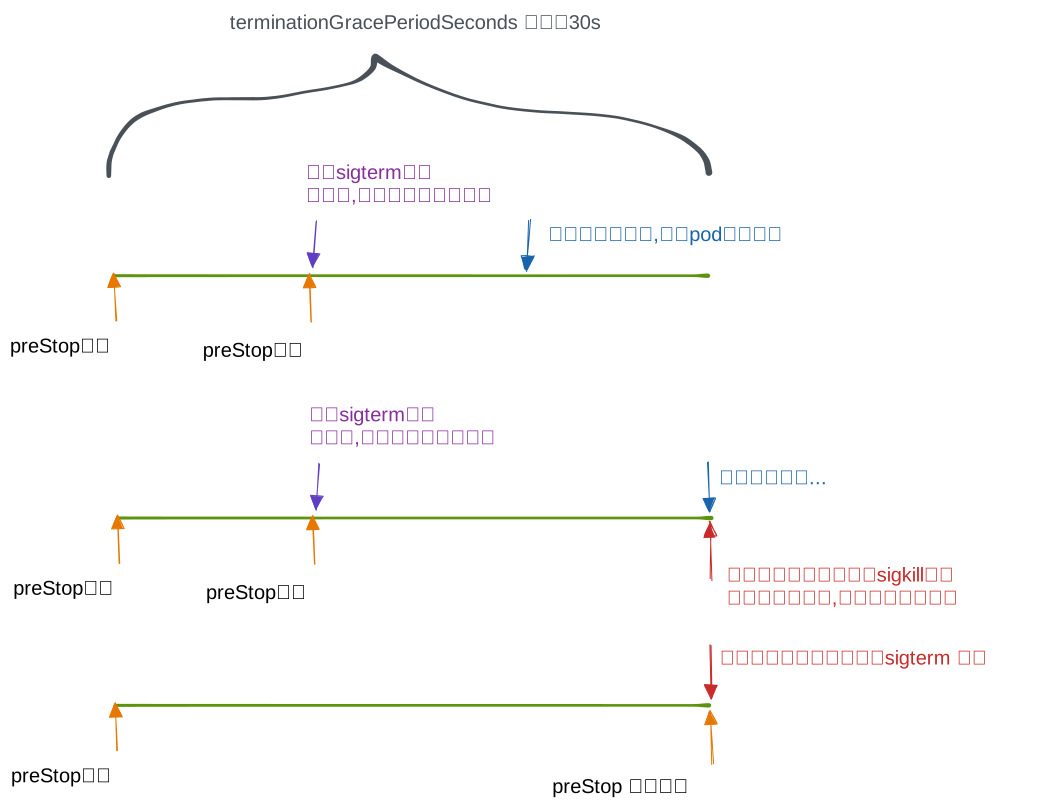
7 init容器
相比普通的container,Init Containers 的生命周期会先于所有的 Containers运行,并且严格按照定义的顺序执行.
- Init容器可以包含一些安装过程中应用容器中不存在的实用工具或个性化代码
- Init容器可以安全地运行这些工具,避免这些工具导致应用镜像的安全性降低
- Init容器可以以root身份运行,执行一些高权限命令
- Init容器 ==相关操作执行完成以后即退出,不会给业务容器带来安全隐患==
在主应用启动之前,做一些初始化的操作,比如创建文件、修改内核参数、等待 依赖程序启动或其他需要在主程序启动之前需要做的工作
postStart与init的对比
- PostStart:依赖主应用的环境,而且并不一定先于Command运行
- InitContainer:不依赖主应用的环境,可以有更高的权限和更多的工具,一定会在主应用启动之前完成
初始化容器和普通容器的区别
- Init 容器与普通的容器非常像,除了如下几点:
- 如果为一个 Pod 指定了多个 Init 容器,这些容器会按顺序逐个运行。 每个 Init 容器必须运行成功,下一个才能够运行。当所有的 Init 容器运行完成时, Kubernetes 才会为 Pod 初始化应用容器并像平常一样运行
- 如果pod的Init 容器失败,Kubernetes 会不断地重启该 Pod,直到 Init 容器成功为止
- 如果Pod 对应的 restartPolicy 值为 Never,init失败了.则Kubernetes 不会 重新启动 Pod。
- Init 容器不支持 lifecycle、livenessProbe、 readinessProbe 和 startupProbe
Init 容器是一种特殊容器,在 Pod 内的应用容器启动之前运行。Init 容器可以包括一些应用镜像中不存在的实用工具和安装脚本
pod-with-2init.yaml
apiVersion: v1
kind: Pod
metadata:
  name: pod-with-2init
  labels:
    app: pod-with-2init
spec:
  containers:
  - name: c-main
    image: busybox:1.28
    command: ['sh', '-c', 'echo The app is running! && sleep 3600']
  initContainers:
  - name: c-init-wait-service
    image: busybox:1.28
    command: ['sh', '-c', 'until nslookup wait-service; do echo waiting for wait-service; sleep 2; done;']
  - name: c-init-wait-db
    image: busybox:1.28
    command: ['sh', '-c', 'until nslookup wait-db; do echo waiting for wait-db; sleep 2; done;']
---
apiVersion: v1
kind: Service
metadata:
  name: wait-service
  labels:
    app: wait-service
spec:
  ports:
  - protocol: TCP
    port: 80
    targetPort: 9376
---
apiVersion: v1
kind: Service
metadata:
  name: wait-db
  labels:
    app: wait-service
spec:
  ports:
  - protocol: TCP
    port: 80
    targetPort: 9377
# 创建pod
k apply -f pod-with-2init.yaml -l app=pod-with-2init
k get po
NAME READY STATUS RESTARTS AGE
pod-with-2init 0/1 Init:0/2 0 3m7s
# 可以看到2个init 容器都在waiting
# 因为我们的svc ,还没创建, nslookup wait-service
# 显示的时候按照顺序显示,
k describe po pod-with-2init |grep -E 'c-|state' -i
c-init-wait-service: # 启动了 在运行
State: Running
c-init-wait-db: # 由于 c-init-wait-service 这个容器没有运行成功,所以等待
State: Waiting
c-main:
State: Waiting
k logs pod-with-2init -c c-init-wait-service
k logs pod-with-2init -c c-init-wait-db
# 这个时候我们创建对应的svc, 先让c-init-wait-service 运行成功
k apply -f pod-with-2init.yaml -l app=wait-service
# 再看pod 状态
k describe po pod-with-2init |grep -E 'c-|state' -i
c-init-wait-service:
State: Terminated
c-init-wait-db: # 前面的运行完毕了,这个才开始运行
State: Running
c-main:
State: Waiting
k apply -f pod-with-2init.yaml -l app=wait-db
# 最后查看
k describe po pod-with-2init |grep -E 'c-|state' -i
c-init-wait-service:
State: Terminated
c-init-wait-db:
State: Terminated
c-main:
State: Running
8 临时容器(debug)
容器的安全考虑,如果你的容器里安装了太多的东西, 比如ssh,可能让黑客越权访问你的节点, 所以一般用最小的镜像来减少攻击面并减少故障和漏洞的暴露
Distroless 镜像 允许用户部署最小的容器镜像
但是如果我们给容器安装最小的东西, 如果你的容器出了问题需要调试, 里面什么命令都没有… 就麻烦了
可以在现有 Pod 中运行临时容器来检查其状态并运行任意命令
与常规容器一样,将临时容器添加到 Pod 后,将不能更改或删除临时容器
# 会报错,因为corednspod 里基本东西没有.
ks exec -it coredns-65c54cc984-4p2zj -- sh
# 我们创建一个临时容器 名字叫debugger-x, 并进入交互
# 由于coredns 默认没有开启进程命名空间共享. 所以这里需要 使用--target=pod里你想进行调试的容器名
ks debug coredns-65c54cc984-4p2zj -it -c debugger-x --image=busybox --target=coredns
# 退出后,临时容器就没了
# 不指定临时容器名,名字会自动创建一个名字
ks debug coredns-65c54cc984-4p2zj -it  --image=busybox --target=coredns
# 进入临时容器后 执行命令看看
ps  # 你才会看到, coredns 容器运行的进程. --target 让他们共享一个命名空间了
    USER     TIME  COMMAND
    1 root      1:52 /coredns -conf /etc/coredns/Corefile
   15 root      0:00 sh
   21 root      0:00 ps

# 会看到里面拉取镜像,创建并启动了一个容器,名字debugger-xxx
ks describe  po  coredns-65c54cc984-4p2zj

# 退出临时交互后
ks describe  po  coredns-65c54cc984-4p2zj|grep -E 'Containers|debugger|State|coredns:$'
  Containers:
    coredns:
      State:          Running
  Ephemeral Containers:
    debugger-x7ld5:
      State:          Terminated
    debugger-x:
State: TerminatedapiVersion: v1
kind: Pod
metadata:
name: pod-nginx
labels:
app: pod-nginx
spec:
shareProcessNamespace: true
containers:
- name: c-main
image: nginx:1.14.2# 本身开启 pid命名空间共享的 pod, 不需要 --target
k debug pod-nginx -it --image=busybox
ps
PID USER TIME COMMAND
1 65535 0:00 /pause
7 root 0:00 nginx: master process nginx -g daemon off;
13 101 0:00 nginx: worker process
14 root 0:00 sh
20 root 0:00 ps实际的原理 应该类似下面这样, 给pod 注入一个容器. pod 里的容器是共享 命名空间等的
Share Process Namespace between Containers in a Pod | Kubernetes
apiVersion: v1
kind: Pod
metadata:
  name: nginx
spec:
  shareProcessNamespace: true    # 需要打开
  containers:
  - name: nginx
    image: nginx
  - name: shell
    image: busybox:1.28
    securityContext:
      capabilities:
        add:
        - SYS_PTRACE
    stdin: true
    tty: true
# 1. Create the pod `nginx` on your cluster:
# 2. Attach to the `shell` container and run `ps`:
kubectl attach -it nginx -c shellkubectl-debug