rust 模块
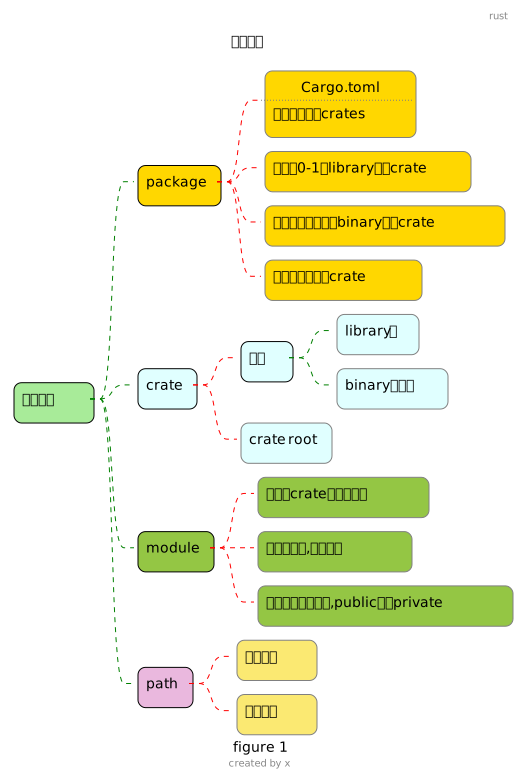
1 crate1
Rust 程序由 crate组成. 每个 crate 都是既完整又内聚的单元,包括单个库(library)或可执行程序的所有源代码,以及任何相关的测试、示例、工具、配置和其他杂项
crate root 是源代码文件,编译器会从这里开始组成你的crate的根module
cargo new hello
cd hello
tree
.
├── Cargo.toml
└── src
    ├   # 这个是 binary crate 的crate root
    ├   # 这个 binary crate 的名字与package相同, hello
    └── main.rs
# 我们手动创建一个library crate
# 这个 library crate 的名字也是与package相同,hello
touch src/lib.rs # 这个文件默认就是 library crate 的crate root
Cargo.toml 没有指定上面2个文件名是 crate root ,因为这个是一种默认约定, 就像go里的main.go, cargo 会把crate root 文件给 rustc来构建
2 module
模块是组织代码的一种方式,它允许你将代码分割到不同的文件中,并让每个文件只包含相关的代码. 模块可以嵌套,并且可以被任意数量的模块使用
mod front_of_house {
    mod hosting {
        fn add_to_waitlist() {}
        fn seat_at_table() {}
    }
    mod serving {
        fn take_order() {}
        fn serve_order() {}
        fn take_payment() {}
    }
}
前面我们说到 src/main.rs and src/lib.rs 之所以被称为 crate root, 这是因为 main.rs或lib.rs 文件的内容形成了一个名字叫做 crate的模块,位于module tree的root位置
上面代码的 module tree
crate #(根部,名字为crate的模块)
 └── front_of_house # (名字为front_of_house的模块)
     ├── hosting #(名字为hosting的模块)
     │   ├── add_to_waitlist
     │   └── seat_at_table
     └── serving #(名字为serving的模块)
         ├── take_order
         ├── serve_order
         └── take_payment
就像目录一样, 这样我们是不是就可以像目录一样的访问方式去找到我们的模块
3 path,pub
- 没有设置
pub相当于 设置pub(self) pub(xxxx)表示被约束的东西只能被xxxx及其子模块访问- 单独的
pub表示能被外部访问
src/lib.rs
// 没有pub 的模块, 表示只能被当前模块及其后代模块访问
// 对front_of_house 来说 ,当前模块是 crate
mod front_of_house {
    // 如果没有pub, 表示 hosting模块是私有的, 只能被当前模块及其后代模块访问
    // 对hosting 来说 ,当前模块是front_of_house
    // 该mod 如果要让外部访问, 需要 + pub
    pub mod hosting {
        // 方法同理
        pub fn add_to_waitlist() {}
    }
}

pub fn eat_at_restaurant() {
    // 绝对路径调用, 这个lib.rs 文件隐含着 形成的 名为 crate的模块
    // 同理如果你在 main.rs 中 使用crate:: 表示main.rs 文件里找模块
    // 因为 front_of_house 和 eat_at_restaurant 在同一个crate中,
    // 注意 eat_at_restaurant 是方法,不是模块, 所以它是在 根模块 crate 中
    // 好比 linux的目录 / 中, 而 front_of_house 是模块, 就好比 /front_of_house 目录
    // 所以可以直接使用 crate:: 来,不需要 pub front_of_house
    crate::front_of_house::hosting::add_to_waitlist();

    // 相对路径
    // 好比在目录 / 中访问 front_of_house/hosting/add_to_waitlist
    front_of_house::hosting::add_to_waitlist();

    let mut meal = back_of_house::Breakfast::summer("Rye");
    meal.toast = String::from("Wheat");
    println!("I'd like {} toast please", meal.toast);

    //  seasonal_fruit 是私有的, 无法访问
    // meal.seasonal_fruit = String::from("blueberries");
}

fn deliver_order() {}

mod back_of_house {
    fn fix_incorrect_order() {
        cook_order();
        // super 父模块 ,得到根模块 crate
        // 子模块访问父模块的方法, 方法不需要pub
        super::deliver_order();
        // 绝对路径
        crate::deliver_order();
    }

    fn cook_order() {
        // 父模块访问子模块 fridge里的方法, 方法需要pub
        fridge::get_item();
    }
    // 没有pub 的模块, 只对被当前模块及其后代模块访问
    // 对fridge 来说 ,当前模块是 back_of_house
    mod fridge {
        pub fn get_item() {}
        // 没有pub的, 表示只能被当前模块, 这里就是 fridge 访问
        fn get_item2(){}
        fn get_item3(){
            self::get_item2();
        }
    }

    // 结构体的 权限
    pub struct Breakfast {
        pub toast: String, // pub
        seasonal_fruit: String, //私有
    }

    impl Breakfast {
        pub fn summer(toast: &str) -> Breakfast {
            Breakfast {
                toast: String::from(toast),
                seasonal_fruit: String::from("peaches"),
            }
        }
    }
    // 枚举的权限, 只要 pub enum ,成员变体就全是pub了
    pub enum Appetizer {
        Soup,
        Salad,
    }
}
pub(crate) pub(self) pub(super)
pub mod back {
    pub fn hello() {
        println!("hello");
    }
}
pub mod back2 {
    // 表示给只能被crate 模块及其子模块访问
    pub(crate) fn world2() {
        println!("world2");
    }
    pub fn world22() {
        println!("world22");
    }
    // pub(self) 表示只能被当前模块以及子模块访问
    // 这和不带 pub(self) 是一样的.
    // 等同于 fn world222()
    pub(self) fn world222() {
        println!("world222");
    }
    pub mod back2_son {
        // pub(super) 表示该back2_son_1方法只能被父模块
        // 也就是back2及其子模块访问
        pub(super) fn back2_son_1() {
            println!("back2_son_1");
        }
        pub fn back2_son_2() {
            println!("back2_son_2");
        }
        // in 只能设置父模块或祖先模块
        pub(in crate::back2) fn back2_son_3() {
            println!("back2_son_3");
        }
    }
    mod back2_son2 {

        fn say() {
            super::back2_son::back2_son_1();
            super::back2_son::back2_son_2();
        }
    }
}
// 表示给crate 模块及其子模块使用
// 在main.rs 里是无法使用的.
pub(crate) mod back3 {
    pub fn world3() {
        println!("world3");
        crate::back2::back2_son::back2_son_2();
        // crate::back2::back2_son::back2_son_1(); 不可访问
    }
}4 use
use 语句将路径引入到当前作用域,从而允许你使用路径中指定的名称
4.1 mod
mod front_of_house {
    pub mod hosting {
        pub fn add_to_waitlist() {}
        pub struct Dog {}
    }
}
// 将hosting 引入当前作用域, 这样 就能直接使用 这个hosting模块
// 相当于在 crate 根模块中 定义了 hosting 模块
1use crate::front_of_house::hosting;
// 使用相对路径, as 别名
use front_of_house::hosting as hosting2;
// 引入函数一般是引入到父级模块
// 可以use 引入具体的函数,但是一般我们不这样弄,
// 因为 最后是让你自己知道使用的函数是引入的模块里的还是你自己这里定义的
use front_of_house::hosting::add_to_waitlist as waitlist;
// 如果是引入 struct enum 等其他不是函数的东西 ,一般就use 到 具体的struct,enum.
use front_of_house::hosting::Dog;

// 外部代码 默认是不能访问, use 还需要 加上pub
// pub use 表示导出, 这样外部代码就能 导入到它的作用域
pub use front_of_house::hosting as pub_hosting;

pub fn eat_at_restaurant() {
    hosting::add_to_waitlist();
    hosting2::add_to_waitlist();
    waitlist();
    let a = Dog {};
}

mod back_of_house {
    use crate::front_of_house::hosting;

    fn take() {
        // 当前这个 back_of_house 模块下想直接使用, 还是得 use 引入
        // add_to_waitlist 还是必须pub
        hosting::add_to_waitlist();
        // 使用super 来
        super::hosting::add_to_waitlist();
    }
}- 1
- 将hosting 引入当前作用域, 这样 就能直接使用 这个hosting模块 相当于在 crate 根模块中 定义了 hosting 模块
4.2 外部package
Cargo.toml添加要依赖的包- 代码中使用 use 将包引入到自己的作用域
- 虽然std标准库也是外部包,但是已经被内置,所以不需要
Cargo.toml中添加
添加包
查看一下Cargo.toml
4.3 本地package
main.rs 变为本地 package的使用者. The module tree should be defined in src/lib.rs. Then, any public items can be used in the binary crate by starting paths with the name of the package. The binary crate becomes a user of the library crate just like a completely external crate would use the library crate
4.4 use 其他语法
使用{} 来简写
使用*
4.5 prelude
标准库中有一些非常常用的东西,我们可能每一个rs文件都要去use相关的, 所以rust编译期自动的为每一个crate插入一句use std::prelude::*;
5 module 拆分
src/main.rs
// mod 后 就可以直接在 main() 里使用 front_of_house::hosting::add_to_waitlist()
// 这样 显式mod 后, 才会将 该mod 的代码进行编译
1mod front_of_house;

// 上面mod 后, 我们才能用 use 的方式
use crate::front_of_house::hosting;

pub fn eat_at_restaurant() {
    hosting::add_to_waitlist();
}

fn main() {
    front_of_house::hosting::add_to_waitlist();
    hosting::add_to_waitlist();
}- 1
-
如果我们在定义mod 时, 模块名后面跟着
;号, 那么rust 必须能从src目录下找到(否则报错)
1. 与模块同名的文件,里面的内容就是这个模块的定义
2. 或者与模块同名的文件夹(文件夹里需要一个mod.rs文件,它的内容就是模块的定义)
理解为将该文件包含到main.rs中,相当于如下代码
src/main.rs
我们继续将front_of_house模块里的hosting模块进行拆分
我们需要在 front_of_house 目录下创建hosting.rs 文件